Overthewire bandit level 0->5

Bandit0
Connect to the server:
ssh -p 2220 bandit0@bandit.labs.overthewire.org
using secure shell to connect to bandit.labs.overthewire.org through port 2220 with the username : bandit0
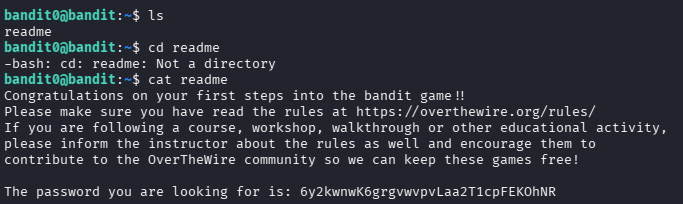
ls
listing files and sub-directory located in the directory
cat readme
cat : command commonly used to display file's content
displaying the content of file name's readme
Bandit1
Connect to the server:
ssh -p 2220 bandit1@bandit.labs.overthewire.org
using secure shell to connect to bandit.labs.overthewire.org through port 2220 with the username : bandit1
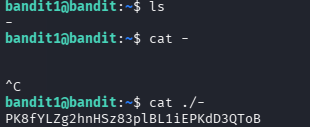
ls
listing files and sub-directory located in the directory
cat ./-
cat : command commonly used to display file's content
using ./ = current directory
so cat ./- => displaying the content of "-" located in the current directory
Bandit2
Connect to the server:
ssh -p 2220 bandit2@bandit.labs.overthewire.org
using secure shell to connect to bandit.labs.overthewire.org through port 2220 with the username : bandit2
ls
listing files and sub-directory located in the directory
cat ./"--spaces in this filename--"
cat : command commonly used to display file's content
using "" => the inside of the double column is the file name

Bandit3
Connect to the server:
ssh -p 2220 bandit3@bandit.labs.overthewire.org
using secure shell to connect to bandit.labs.overthewire.org through port 2220 with the username : bandit3
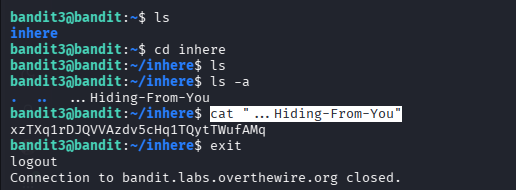
cd inhere
change directory to inhere
ls -a
listing all files and sub-directory located in the directory
cat "...Hiding-From-You"
cat : command commonly used to display file's content
Bandit4
Connect to the server:
ssh -p 2220 bandit4@bandit.labs.overthewire.org
using secure shell to connect to bandit.labs.overthewire.org through port 2220 with the username : bandit4
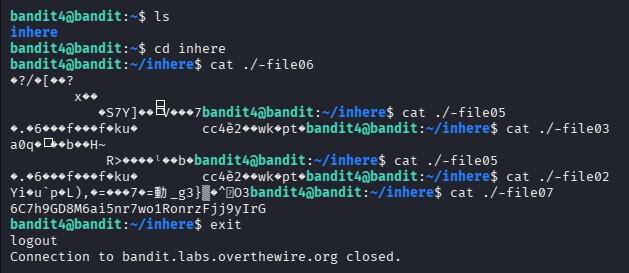
cd inhere
change directory to inhere
cat ./-file07
display it manually
Bandit5
Connect to the server:
ssh -p 2220 bandit4@bandit.labs.overthewire.org
using secure shell to connect to bandit.labs.overthewire.org through port 2220 with the username : bandit4
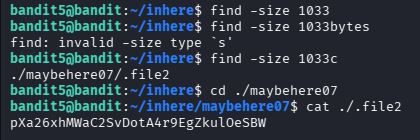
cd inhere
change directory to inhere
find -readable -size 1033c
find = command to find a file with certain requirement
-readable = readable file
-size 1033c => size 1033 byte
so find -readable -size 1033c => find readable file with the size of 1033 byte
"No one knows what the future holds, that's why its potential is infinite." ~My Goat => Okabe Rintarou (Hoouin Kyouma)